Data engineering with Azure & Databricks
ETL using Azure and Databricks with a medallion architecture
Project Overview
When I decided on my first portfolio project, the UK data job market insights one of its main purposes was to better understand where demand and value existed in the market, and to use those insights to help guide my own upskilling.
From a data engineering perspective, Azure appeared very dominant in the UK market, with services such as Databricks and Synapse mentioned consistently. From a BI perspective, Tableau emerged as the second most commonly requested tool. Based on this, I decided to incorporate all three into this project.
I was also keen to work with a different type of data source, so for this project I chose an on-premises SQL Server and used the AdventureWorks sample database. In terms of transformations, I wanted to follow an industry-standard Bronze → Silver → Gold pattern to reflect how modern data platforms are typically structured in production environments.
Architecture
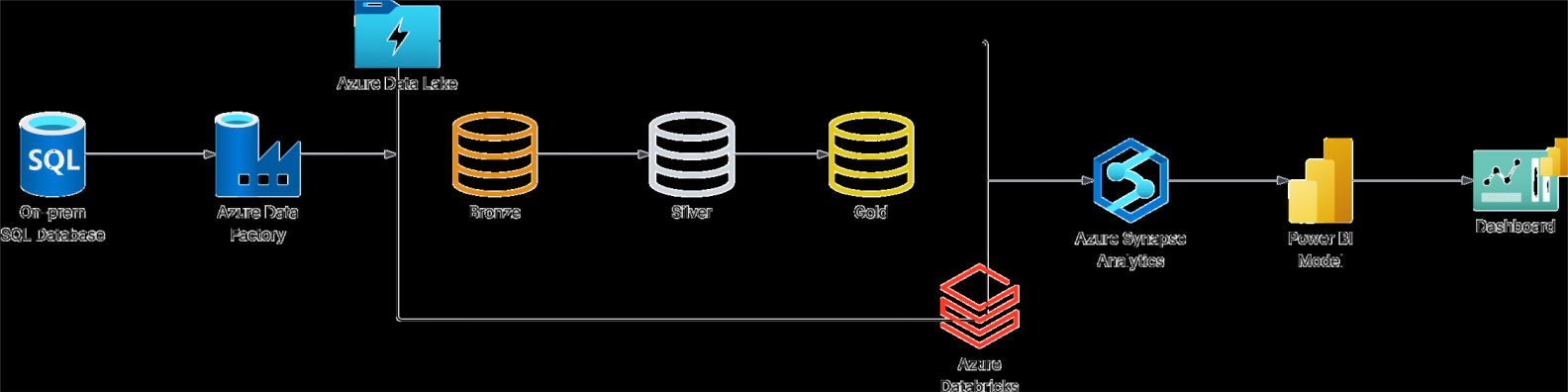
Technical Stack
- Azure Data Factory - Orchestration and data integration
- Azure Data Lake Storage Gen2 - Scalable data lake storage
- Azure Databricks - Data transformation and analytics
- Azure Synapse Analytics - Serverless SQL querying
- Azure Key Vault - Secure secrets management
- Microsoft Entra ID - Identity and access management
- Tableau - Business intelligence and visualization
Implementation Overview
Data Ingestion
Data ingestion was handled using Azure Data Factory to securely extract data from an on-premises SQL Server environment and land it in Azure in a scalable, repeatable way.
Because the source database was hosted locally, a Self-Hosted Integration Runtime (SHIR) was installed and configured on the machine running SQL Server. This allowed Azure Data Factory to communicate securely with the on-prem environment without exposing the database publicly.
Rather than hard-coding individual tables, the ingestion pipeline was designed to be fully dynamic:
- A Lookup activity queries SQL Server system tables to discover all tables within the
SalesLTschema - The results are returned as JSON and passed into a ForEach activity
- Each table is extracted using a dynamically generated
SELECT * FROM schema.tablestatement
This approach ensures the pipeline automatically adapts if tables are added or removed, without requiring code changes.
All extracted data is written to Azure Data Lake Storage Gen2 in Parquet format, organised into a Bronze layer using a structured folder layout:
bronze/{schema}/{table}/{table}.parquet
Data Transformation
Data transformation was implemented using Azure Databricks and follows a clear Bronze → Silver → Gold pattern to separate raw data from curated and business-ready datasets.
Bronze → Silver
The Silver layer focuses on data cleanliness and consistency. Databricks notebooks read the raw Parquet files from the Bronze layer and the following transformations were applied:
- Update column headers to snake case
- Use Regex to insert an underscore to separate words or letters
- Auto-detect address fields and update them to dd-mm-yyyy format, ensuring they remain in date formatted
The cleaned data is written to the Silver layer using Delta Lake, which adds transaction support, schema enforcement, and version history on top of Parquet.
## Bronze to Silver
# In this Python notebook, I connected to the bronze layer, made some basic transformations before moving into the silver layer, where further improvements are to be made.

### Secure data lake access

# This step configures Databricks to securely access Azure Data Lake Storage using OAuth and an Azure service principal.
# Credentials are retrieved from Databricks Secrets, avoiding hard-coded keys and manual storage mounts.

# Once configured, the notebook can directly read from and write to the Bronze, Silver, and Gold containers using abfss:// paths, mirroring a production-style lakehouse setup.
spark.conf.set("fs.azure.account.auth.type.gbosstorageaccount.dfs.core.windows.net", "OAuth")
spark.conf.set("fs.azure.account.oauth.provider.type.gbosstorageaccount.dfs.core.windows.net", "org.apache.hadoop.fs.azurebfs.oauth2.ClientCredsTokenProvider")
spark.conf.set("fs.azure.account.oauth2.client.id.gbosstorageaccount.dfs.core.windows.net", dbutils.secrets.get(scope="my-scope", key="client-id"))
spark.conf.set("fs.azure.account.oauth2.client.secret.gbosstorageaccount.dfs.core.windows.net", dbutils.secrets.get(scope="my-scope", key="client-secret"))
spark.conf.set("fs.azure.account.oauth2.client.endpoint.gbosstorageaccount.dfs.core.windows.net", "https://login.microsoftonline.com/5d5ed5dc-15a7-49c2-99e6-d3bd5764b356/oauth2/token")

print("  Azure Data Lake Storage access configured")
print("  Bronze: abfss://bronze@gbosstorageaccount.dfs.core.windows.net/")
print("  Silver: abfss://silver@gbosstorageaccount.dfs.core.windows.net/")
print("  Gold:   abfss://gold@gbosstorageaccount.dfs.core.windows.net/")

### Validate data lake connectivity

# This step verifies that secure access to the data lake has been configured correctly by listing the contents of the Bronze and Silver containers. It acts as a quick sanity check before any transformations are run, confirming that Databricks can successfully read from and write to the lake using the configured abfss:// paths.

dbutils.fs.ls('abfss://bronze@gbosstorageaccount.dfs.core.windows.net/SalesLT/')

### Load and inspect Silver data
# This step reads a sample table from the Silver layer into a Spark DataFrame and displays the contents. It provides a quick validation that the raw parquet data is accessible and structured as expected before applying any transformations.

dbutils.fs.ls('abfss://silver@gbosstorageaccount.dfs.core.windows.net/')

### Load Bronze Address table
# This step loads the Address table from the Bronze layer parquet files into a Spark DataFrame, making the raw data available for inspection and transformation in subsequent steps.

df_address = spark.read.format('parquet').load('abfss://bronze@gbosstorageaccount.dfs.core.windows.net/SalesLT/Address/Address.parquet')

### Inspect loaded Bronze data
# This step displays the contents of the Address table after loading it into a Spark DataFrame, allowing the schema and sample records to be visually inspected before applying any transformations.

display(df_address)

### Create a reusable column naming helper (snake_case)
# This step defines a small utility function that converts column names from CamelCase / mixedCase into snake_case.
# It uses regular expressions to insert underscores in the right places (e.g. before capitals and numbers), then lowercases everything.
# This makes schemas consistent across tables and easier to work with in SQL / BI tools.

import re

def to_snake_case(name: str) -> str:

    s1 = re.sub('(.)([A-Z][a-z]+)', r'\1_\2', name)

    s2 = re.sub('([a-z0-9])([A-Z0-9])', r'\1_\2', s1)

    return s2.lower()

### Validate the snake_case conversion logic
# This step runs a few sample column names through the snake_case function to confirm the output is correct.
# It’s a quick sanity check before applying the logic to an entire DataFrame.

test_cols = [
    "AddressID",
    "AddressLine1",
    "rowguid",
    "SalesOrderHeader",
    "ProductModelID"
]

[(c, to_snake_case(c)) for c in test_cols]

### Wrap the column rename into a reusable DataFrame function
# This step creates a helper that applies snake_case conversion across *all* columns in a Spark DataFrame in one go.
# It returns a new DataFrame with consistent, standardised column names.

def normalise_column_names(df):
    return df.toDF(*[to_snake_case(c) for c in df.columns])

### Apply standardised column names to the Address table
# This step applies the snake_case renaming function to the Address DataFrame and displays the result.
# It confirms that the column headers have been updated consistently before moving on to type/format cleanup.

df_address = normalise_column_names(df_address)
display(df_address)

### Import date and schema utilities for type normalisation
# This step imports Spark functions and data types needed to detect and standardise date/time fields.
# These utilities will be used to normalise timestamp/date columns across tables in a consistent, reusable way.

from pyspark.sql.functions import col, date_format
from pyspark.sql.types import DateType, TimestampType

### Auto-detect and normalise date/time columns
# This step defines a reusable function that scans the DataFrame schema for TimestampType and DateType columns.
# Timestamp columns are cast to DATE to keep the field in a true date format (rather than converting it to a text string).
# This makes downstream modelling and BI work more predictable.

def format_all_datetime_columns(df, date_pattern="dd-MM-yyyy"):
    """
    Auto-detect DateType and TimestampType columns and normalise them to DATE type.
    Dates remain as dates (not strings).
    """
    for f in df.schema.fields:
        if isinstance(f.dataType, TimestampType):
            df = df.withColumn(f.name, col(f.name).cast(DateType()))
        elif isinstance(f.dataType, DateType):
            df = df.withColumn(f.name, col(f.name))
    return df
### Apply date/time normalisation to the Address table

# This step runs the auto-detect date/time normalisation function against the Address DataFrame and displays the result.
# It confirms that timestamp-based date fields have been converted into a consistent DATE type.

df_address = format_all_datetime_columns(df_address, date_pattern="dd-MM-yyyy")
display(df_address)

### Create a single reusable “Silver transforms” wrapper
# This step bundles all Silver-layer standardisation into one reusable function:
# - standardise column names (snake_case)
# - normalise date/time fields to DATE type
# This makes it easy to apply consistent transformations across multiple tables with minimal repeated code.

def apply_silver_transforms(df):
    df = normalise_column_names(df)
    df = format_all_datetime_columns(df)
    return df

### Transform all Bronze tables and write to Silver as Delta

# This step loops through all discovered Bronze tables, loads each one, applies the reusable Silver transforms, and writes the output to the Silver layer.
# Each table is written as a Delta dataset using an overwrite mode, keeping the Silver layer refreshed and consistent for downstream Gold modelling.

bronze_root = "abfss://bronze@gbosstorageaccount.dfs.core.windows.net/SalesLT"

def apply_silver_transforms(df):
    df = normalise_column_names(df)
    df = format_all_datetime_columns(df)
    return df

for i in table_name:

    bronze_path = f"{bronze_root}/{i}/{i}.parquet"
    df = spark.read.format("parquet").load(bronze_path)

    df = apply_silver_transforms(df)

    output_path = (
        "abfss://silver@gbosstorageaccount.dfs.core.windows.net/SalesLT/"
        + i
        + "/"
    )

    df.write.format("delta") \
    .mode("overwrite") \
    .option("overwriteSchema", "true") \
    .save(output_path)

    print(f"{i} written to Silver as Delta")
Silver → Gold
The Gold layer represents analytics-ready business data. At this stage, the focus shifts from cleaning to modelling:
- Producing fact and dimension-style outputs optimised for BI tools
- Applying business logic and calculations
- Remove unwanted columns
Delta Lake continues to be used at this layer, enabling reliable overwrites, easy debugging via version history, and resilience to schema evolution.
## Silver to Gold
# This notebook transforms curated Silver-layer Delta tables into analytics-ready Gold-layer datasets using a dimensional (star-schema) approach.
# Key objectives of this notebook:
# Build dimension tables (e.g. customer, address, product) with clean keys and descriptive attributes
# Build fact tables at the correct grain (order header and order line)
# Enforce consistent data types, naming, and business-friendly schemas
# Remove technical or source-system-only fields not required for analytics
# Write all Gold outputs as Delta tables for reliability, performance, and downstream BI consumption

### Configure secure data lake access
# This cell configures Databricks to securely access Azure Data Lake Storage using OAuth so that Silver and Gold Delta tables can be read and written without using storage account keys.
# Configure Azure Data Lake Storage access using OAuth
# This replaces the mounting step and provides access to bronze, silver, and gold containers

spark.conf.set("fs.azure.account.auth.type.gbosstorageaccount.dfs.core.windows.net", "OAuth")
spark.conf.set("fs.azure.account.oauth.provider.type.gbosstorageaccount.dfs.core.windows.net", "org.apache.hadoop.fs.azurebfs.oauth2.ClientCredsTokenProvider")
spark.conf.set("fs.azure.account.oauth2.client.id.gbosstorageaccount.dfs.core.windows.net", dbutils.secrets.get(scope="my-scope", key="client-id"))
spark.conf.set("fs.azure.account.oauth2.client.secret.gbosstorageaccount.dfs.core.windows.net", dbutils.secrets.get(scope="my-scope", key="client-secret"))
spark.conf.set("fs.azure.account.oauth2.client.endpoint.gbosstorageaccount.dfs.core.windows.net", "https://login.microsoftonline.com/5d5ed5dc-15a7-49c2-99e6-d3bd5764b356/oauth2/token")

print("Azure Data Lake Storage access configured")
print("  Bronze: abfss://bronze@gbosstorageaccount.dfs.core.windows.net/")
print("  Silver: abfss://silver@gbosstorageaccount.dfs.core.windows.net/")
print("  Gold:   abfss://gold@gbosstorageaccount.dfs.core.windows.net/")

### Validate Silver layer availability
# This cell lists the contents of the Silver container to confirm that all expected curated Delta tables are available before Gold transformations begin.

dbutils.fs.ls('abfss://silver@gbosstorageaccount.dfs.core.windows.net/SalesLT/')
files = dbutils.fs.ls(
    "abfss://silver@gbosstorageaccount.dfs.core.windows.net/"
)
if files:
    display(files)
else:
    print("No files found in the specified path.")

### Load Silver Customer table
# This cell reads the curated Silver Customer Delta table into a Spark DataFrame for downstream dimensional modelling.

df_customer = spark.read.format('delta').load('abfss://silver@gbosstorageaccount.dfs.core.windows.net/SalesLT/Customer/')
display(df_customer)

### Build Customer dimension (dm_customer)
# This cell creates the Customer dimension by selecting business-friendly customer attributes, generating a clean customer key, and preparing the data for analytics use.

from pyspark.sql import functions as F

silver_customer_path = "abfss://silver@gbosstorageaccount.dfs.core.windows.net/SalesLT/Customer/"
gold_dm_customer_path = "abfss://gold@gbosstorageaccount.dfs.core.windows.net/SalesLT/dm_customer/"

df_customer = spark.read.format("delta").load(silver_customer_path)

dm_customer = (
    df_customer
    .select(
        F.col("customer_id").cast("int").alias("customer_key"),
        F.col("title"),
        F.col("first_name"),
        F.col("middle_name"),
        F.col("last_name"),
        F.col("suffix"),
        F.col("company_name"),
        F.col("sales_person"),
        F.col("email_address"),
        F.col("phone"),
        F.col("modified_date")
    )

    .withColumn(
        "full_name",
        F.trim(
            F.concat_ws(
                " ",
                F.col("title"),
                F.col("first_name"),
                F.col("middle_name"),
                F.col("last_name"),
                F.col("suffix")
            )
        )
    )
    .withColumn("email_address", F.lower(F.col("email_address")))
    .dropDuplicates(["customer_key"])
)
display(dm_customer)


This cell loads the Silver Address Delta table to prepare address attributes for dimensional modelling.

df_address = spark.read.format('delta')
df_address = spark.read.format('delta').load('abfss://silver@gbosstorageaccount.dfs.core.windows.net/SalesLT/Address/')
display(df_address)

### Build Address dimension (dm_address)
# This cell constructs the Address dimension by selecting location-related attributes and ensuring one row per address.

from pyspark.sql import functions as F

silver_address_path = "abfss://silver@gbosstorageaccount.dfs.core.windows.net/SalesLT/Address/"
gold_dm_address_path = "abfss://gold@gbosstorageaccount.dfs.core.windows.net/SalesLT/dm_address/"

df_address = spark.read.format("delta").load(silver_address_path)

dm_address = (
    df_address
    .select(
        F.col("address_id").cast("int").alias("address_key"),
        F.col("address_line_1"),
        F.col("address_line_2"),
        F.col("city"),
        F.col("state_province"),
        F.col("country_region"),
        F.col("postal_code"),
        F.col("modified_date")
    )
    .dropDuplicates(["address_key"])
)

display(dm_address)
dm_address.printSchema()

### Load Silver CustomerAddress table
# This cell reads the Silver CustomerAddress Delta table, which represents the relationship between customers and addresses.

df_customer_address = spark.read.format('delta')
df_customer_address = spark.read.format('delta').load('abfss://silver@gbosstorageaccount.dfs.core.windows.net/SalesLT/CustomerAddress/')
display(df_customer_address)

### Build Customer–Address bridge dimension
# This cell creates a bridge table that models the many-to-many relationship between customers and addresses, preserving address types.

from pyspark.sql import functions as F

silver_customer_address_path = "abfss://silver@gbosstorageaccount.dfs.core.windows.net/SalesLT/CustomerAddress/"
gold_dm_customer_address_path = "abfss://gold@gbosstorageaccount.dfs.core.windows.net/SalesLT/dm_customer_address/"

df_customer_address = spark.read.format("delta").load(silver_customer_address_path)

dm_customer_address = (
    df_customer_address
    .select(
        F.col("customer_id").cast("int").alias("customer_key"),
        F.col("address_id").cast("int").alias("address_key"),
        F.trim(F.col("address_type")).alias("address_type"),
        F.col("modified_date")
    )
    .dropDuplicates(["customer_key", "address_key", "address_type"])
)

display(dm_customer_address)
dm_customer_address.printSchema()

### Load Silver Product table
# This cell loads the Silver Product Delta table containing product attributes and pricing details.

df_product = spark.read.format('delta')
df_product = spark.read.format('delta').load('abfss://silver@gbosstorageaccount.dfs.core.windows.net/SalesLT/Product/')
display(df_product)

### Build Product dimension (dm_product)
# This cell builds the Product dimension by selecting descriptive product attributes and deriving useful analytical measures such as margin.

from pyspark.sql import functions as F

silver_product_path = "abfss://silver@gbosstorageaccount.dfs.core.windows.net/SalesLT/Product/"
gold_dm_product_path = "abfss://gold@gbosstorageaccount.dfs.core.windows.net/SalesLT/dm_product/"

df_product = spark.read.format("delta").load(silver_product_path)

dm_product = (
    df_product
    .select(
        F.col("product_id").cast("int").alias("product_key"),
        F.col("name").alias("product_name"),
        F.col("product_number"),
        F.col("color"),
        F.col("size"),
        F.col("weight").cast("double").alias("weight"),
        F.col("standard_cost").cast("double").alias("standard_cost"),
        F.col("list_price").cast("double").alias("list_price"),
        F.col("product_category_id").cast("int").alias("product_category_key"),
        F.col("product_model_id").cast("int").alias("product_model_key"),
        F.col("sell_start_date"),
        F.col("sell_end_date"),
        F.col("modified_date")
    )
    .withColumn("margin", (F.col("list_price") - F.col("standard_cost")).cast("double"))
    .dropDuplicates(["product_key"])
)

display(dm_product)
dm_product.printSchema()

### Load Silver ProductCategory table
# This cell reads the Silver ProductCategory Delta table, which defines the product category hierarchy.

df_product_category = spark.read.format('delta')
df_product_category = spark.read.format('delta').load('abfss://silver@gbosstorageaccount.dfs.core.windows.net/SalesLT/ProductCategory/')
display(df_product_category)

### Build Product Category dimension (dm_product_category)

This cell creates the Product Category dimension, including parent–child relationships for hierarchical analysis.

from pyspark.sql import functions as F


silver_product_category_path = (
    "abfss://silver@gbosstorageaccount.dfs.core.windows.net/SalesLT/ProductCategory/"
)

gold_dm_product_category_path = (
    "abfss://gold@gbosstorageaccount.dfs.core.windows.net/SalesLT/dm_product_category/"
)


df_product_category = (
    spark.read
    .format("delta")
    .load(silver_product_category_path)
)


dm_product_category = (
    df_product_category
    .select(
        F.col("product_category_id").cast("int").alias("product_category_key"),
        F.col("name").alias("product_category_name"),
        F.col("parent_product_category_id").cast("int").alias("parent_product_category_key"),
        F.col("modified_date")
    )
    .dropDuplicates(["product_category_key"])
)


display(dm_product_category)
dm_product_category.printSchema()

### Load Silver Product Description table
# This cell loads the Silver ProductDescription Delta table containing textual product descriptions.

df_product_description = spark.read.format('delta')
df_product_description = spark.read.format('delta').load('abfss://silver@gbosstorageaccount.dfs.core.windows.net/SalesLT/ProductDescription/')
display(df_product_description)

### Build Product Description dimension (dm_product_description)
# This cell constructs a Product Description dimension to support descriptive and multilingual product reporting.

silver_product_description_path = (
    "abfss://silver@gbosstorageaccount.dfs.core.windows.net/SalesLT/ProductDescription/"
)

df_product_description = (
    spark.read
    .format("delta")
    .load(silver_product_description_path)
)

dm_product_description = (
    df_product_description
    .select(
        F.col("product_description_id").cast("int").alias("product_description_key"),
        F.col("description").alias("product_description"),
        F.col("modified_date")
    )
    .dropDuplicates(["product_description_key"])   # one row per description
)

display(dm_product_description)
dm_product_description.printSchema()

### Load Silver Product Model table
# This cell reads the Silver ProductModel Delta table containing product model metadata.

df_product_model = spark.read.format('delta')
df_product_model = spark.read.format('delta').load('abfss://silver@gbosstorageaccount.dfs.core.windows.net/SalesLT/ProductModel/')
display(df_product_model)

### Build Product Model dimension (dm_product_model)
# This cell builds the Product Model dimension by selecting model names, descriptions, and metadata for analysis.

silver_product_model_path = (
    "abfss://silver@gbosstorageaccount.dfs.core.windows.net/SalesLT/ProductModel/"
)

df_product_model = (
    spark.read
    .format("delta")
    .load(silver_product_model_path)
)

dm_product_model = (
    df_product_model
    .select(
        F.col("product_model_id").cast("int").alias("product_model_key"),
        F.col("name").alias("product_model_name"),
        F.col("catalog_description"),
        F.col("modified_date")
    )
    .dropDuplicates(["product_model_key"])
)

display(dm_product_model)
dm_product_model.printSchema()

### Load Silver Product Model table
# This cell reads the Silver ProductModel Delta table containing product model metadata.

df_product_model_desc = spark.read.format('delta')
df_product_model_desc = spark.read.format('delta').load('abfss://silver@gbosstorageaccount.dfs.core.windows.net/SalesLT/ProductModelProductDescription/')
display(df_product_model_desc)

### Build Product Model dimension (dm_product_model)
# This cell builds the Product Model dimension by selecting model names, descriptions, and metadata for analysis.

from pyspark.sql import functions as F

silver_product_model_product_description_path = (
    "abfss://silver@gbosstorageaccount.dfs.core.windows.net/SalesLT/ProductModelProductDescription/"
)

df_product_model_product_description = (
    spark.read
    .format("delta")
    .load(silver_product_model_product_description_path)
)

dm_product_model_product_description = (
    df_product_model_product_description
    .select(
        F.col("product_model_id").cast("int").alias("product_model_key"),
        F.col("product_description_id").cast("int").alias("product_description_key"),
        F.col("culture"),
        F.col("modified_date")
    )
    .dropDuplicates(
        ["product_model_key", "product_description_key", "culture"]
    )
)

display(dm_product_model_product_description)
dm_product_model_product_description.printSchema()

### Load Silver Sales Order Header table
# This cell reads the Silver SalesOrderHeader Delta table, which represents sales orders at header (order-level) grain.

df_sales_order_header = spark.read.format('delta')
df_sales_order_header = spark.read.format('delta').load('abfss://silver@gbosstorageaccount.dfs.core.windows.net/SalesLT/SalesOrderHeader/')
display(df_sales_order_header)

### Build Sales Order Header fact table
# This cell creates a fact table at the sales order header level, capturing order dates, customer keys, and monetary measures.

from pyspark.sql import functions as F

silver_sales_order_header_path = "abfss://silver@gbosstorageaccount.dfs.core.windows.net/SalesLT/SalesOrderHeader/"
gold_fct_sales_order_header_path = "abfss://gold@gbosstorageaccount.dfs.core.windows.net/SalesLT/fct_sales_order_header/"

df_sales_order_header = spark.read.format("delta").load(silver_sales_order_header_path)

fct_sales_order_header = (
    df_sales_order_header
    .select(
        F.col("sales_order_id").cast("int").alias("sales_order_key"),
        F.col("customer_id").cast("int").alias("customer_key"),
        F.col("ship_to_address_id").cast("int").alias("ship_to_address_key"),
        F.col("bill_to_address_id").cast("int").alias("bill_to_address_key"),

        F.col("order_date"),
        F.col("due_date"),
        F.col("ship_date"),

        F.col("status").cast("int").alias("status"),
        F.col("online_order_flag").cast("boolean").alias("online_order_flag"),

        F.col("sales_order_number"),
        F.col("purchase_order_number"),
        F.col("account_number"),

        # amounts (cast defensively)
        F.col("sub_total").cast("double").alias("sub_total"),
        F.col("tax_amt").cast("double").alias("tax_amt"),
        F.col("freight").cast("double").alias("freight"),
        F.col("total_due").cast("double").alias("total_due"),

        F.col("modified_date")
    )
    .dropDuplicates(["sales_order_key"])
)

display(fct_sales_order_header)
fct_sales_order_header.printSchema()

### Load Silver Sales Order Detail table
# This cell loads the Silver SalesOrderDetail Delta table containing line-level sales transaction data.

df_sales_order_detail = spark.read.format('delta')
df_sales_order_detail = spark.read.format('delta').load('abfss://silver@gbosstorageaccount.dfs.core.windows.net/SalesLT/SalesOrderDetail/')
display(df_sales_order_detail)

### Build Sales Order Detail fact table
# This cell builds the line-level sales fact table, calculating quantities, prices, discounts, and derived financial metrics.

from pyspark.sql import functions as F

silver_sales_order_detail_path = "abfss://silver@gbosstorageaccount.dfs.core.windows.net/SalesLT/SalesOrderDetail/"

df_sales_order_detail = spark.read.format("delta").load(silver_sales_order_detail_path)

fct_sales_order_detail = (
    df_sales_order_detail
    .select(
        F.col("sales_order_id").cast("int").alias("sales_order_key"),
        F.col("sales_order_detail_id").cast("int").alias("sales_order_detail_key"),
        F.col("product_id").cast("int").alias("product_key"),

        F.col("order_qty").cast("int").alias("order_qty"),
        F.col("unit_price").cast("double").alias("unit_price"),
        F.col("unit_price_discount").cast("double").alias("unit_price_discount"),
        F.col("line_total").cast("double").alias("line_total"),

        (F.col("order_qty") * F.col("unit_price")).cast("double").alias("gross_line_amount"),
        (F.col("order_qty") * F.col("unit_price") * F.col("unit_price_discount")).cast("double").alias("discount_amount"),

        F.col("modified_date")
    )
    .dropDuplicates(["sales_order_detail_key"])
)

display(fct_sales_order_detail)
fct_sales_order_detail.printSchema()

### Define Gold output paths
# This cell defines the standardised Gold-layer storage locations for all dimension and fact tables.

gold_root = "abfss://gold@gbosstorageaccount.dfs.core.windows.net/SalesLT"

gold_paths = {
    "dm_customer": f"{gold_root}/dm_customer/",
    "dm_address": f"{gold_root}/dm_address/",
    "dm_customer_address": f"{gold_root}/dm_customer_address/",
    "dm_product": f"{gold_root}/dm_product/",
    "dm_product_category": f"{gold_root}/dm_product_category/",
    "dm_product_model": f"{gold_root}/dm_product_model/",
    "dm_product_description": f"{gold_root}/dm_product_description/",
    "dm_product_model_product_description": f"{gold_root}/dm_product_model_product_description/",
    "fct_sales_order_header": f"{gold_root}/fct_sales_order_header/",
    "fct_sales_order_detail": f"{gold_root}/fct_sales_order_detail/",
}

### Write Gold dimension and fact tables
# This cell writes all prepared Gold dimensions and fact tables to Azure Data Lake Storage as Delta tables for analytics and BI consumption.

gold_tables = {
    "dm_customer": dm_customer,
    "dm_address": dm_address,
    "dm_customer_address": dm_customer_address,
    "dm_product": dm_product,
    "dm_product_category": dm_product_category,
    "dm_product_model": dm_product_model,
    "dm_product_description": dm_product_description,
    "dm_product_model_product_description": dm_product_model_product_description,
    "fct_sales_order_header": fct_sales_order_header,
    "fct_sales_order_detail": fct_sales_order_detail,
}

### Validate Gold layer outputs
# This cell lists the Gold container contents to confirm that all dimension and fact tables have been successfully written.

for table_name, df in gold_tables.items():
    (
        df.write
        .format("delta")
        .mode("overwrite")
        .option("overwriteSchema", "true")
        .save(gold_paths[table_name])
    )
    print(f"{table_name} written to Gold")
Orchestration
End-to-end orchestration is handled by Azure Data Factory, which coordinates ingestion, transformation, and downstream processing.
The pipeline flow is:
- Extract data from on-prem SQL into the Bronze layer
- Trigger Databricks notebooks to transform Bronze → Silver
- Trigger Databricks notebooks to transform Silver → Gold
Databricks notebooks are integrated into Data Factory using linked services, with sensitive access tokens stored securely in Azure Key Vault.
A daily schedule trigger ensures the entire pipeline runs automatically, keeping analytics data up to date without manual intervention.
Operational visibility is provided through:
- Pipeline run monitoring
- Activity-level success and failure tracking
- The ability to rerun failed steps without reprocessing the entire pipeline
This orchestration design closely mirrors how production data pipelines are built and operated in real-world Azure environments.
Serving Gold Data to BI Tools
The curated Gold-layer datasets are exposed via Azure Synapse Analytics (Serverless SQL) and consumed directly by Tableau.
Rather than loading data into a traditional data warehouse, this approach uses a serverless SQL abstraction over the data lake, allowing BI tools to query Delta tables stored in Azure Data Lake as if they were relational tables — without duplicating data.
To support this, a reusable stored procedure is used to dynamically create or update SQL views over each Gold dataset:
- Each view maps directly to a corresponding folder in the Gold layer
- Views are created using
OPENROWSETwithFORMAT = 'DELTA', enabling Synapse to read Delta Lake metadata at query time - The procedure standardises how Gold datasets are exposed, making them immediately consumable by BI tools such as Tableau
This pattern cleanly separates responsibilities:
- Databricks handles transformation and curation (Bronze → Silver → Gold)
- Synapse Serverless SQL provides a lightweight, relational access layer
- Tableau consumes stable, analytics-ready views without requiring data duplication or warehouse storage
USE gold_db
GO

CREATE OR ALTER PROC CreateSQLServerlessView_gold @ViewName nvarchar(100)
AS
BEGIN
    DECLARE @statement VARCHAR(MAX)
    SET @statement = N'CREATE OR ALTER VIEW ' + @ViewName + ' AS
        SELECT
            *
        FROM
            OPENROWSET(
                BULK ''https://gbosstorageaccount.dfs.core.windows.net/gold/SalesLT/' + @ViewName + '/'',
                FORMAT = ''DELTA''
            ) AS [result]'

    EXEC (@statement)
END
GO
Reporting
In contrast to my earlier BI-focused portfolio work, this project prioritises data engineering fundamentals — from ingestion through Bronze/Silver/Gold transformations to consumption in Tableau. The dashboard is deliberately functional, with minimal time spent on visual refinement, to keep the focus on data modelling, transformations, and cross-tool capability.

Security & Governance
- Managed identities used across Azure services
- Secrets stored securely in Azure Key Vault
- RBAC enforced via Microsoft Entra ID
- Security groups used to manage access at scale.